
| Frequency: | Europe 169,4–169,475 MHz |
| Duty Cycle: | 1 % |
| Using Docker: | Yes |
| Last updated: | Sep 20, 2026 |
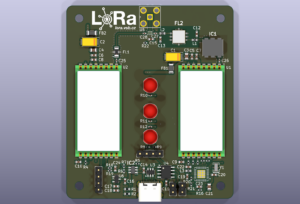
This guide describes the setup and configuration of the LoRa-169 Gateway based on the open-source project LoRa-169.
It explains hardware wiring, software installation, configuration via MQTT, and troubleshooting tips.
Requirements
- Hardware: Raspberry Pi 3 or 4, SX127x LoRa module (169 MHz version)
- Interfaces: SPI enabled, GPIO pins for CS, Reset, and DIO0
- Operating system: Debian / Ubuntu based (Raspberry Pi OS recommended)
- Software: Python 3.7+, MQTT broker (e.g. Mosquitto)
- Network: Internet or local network connection
Hardware Wiring
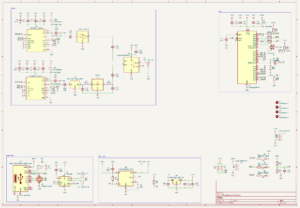
Connect the LoRa module to the Raspberry Pi as follows:
- SPI Bus 0, CS 0
- GPIO 25 – Reset
- GPIO 5 – DIO0 interrupt pin
Use an antenna suitable for the 169 MHz band. Ensure proper grounding, shielding, and filtering for stable RF performance.
Software Installation
- Clone the repository:
git clone https://github.com/lysek01/LoRa-169.git - Enter the project directory:
cd LoRa-169/gateway - Run the installation script:
sudo bash install.shThis script will install all dependencies (Python3, venv, git), create a virtual environment, install packages, and register systemd services.
- Enable and start the services:
sudo systemctl enable loravsb-gateway sudo systemctl start loravsb-gateway - Check service status:
sudo systemctl status loravsb-gateway
sudo journalctl -u loravsb-gateway -f
Configuration
The config.json file contains LoRa radio parameters such as:
frequency(e.g. 169.4375 MHz)spreading_factor,bandwidth,coding_rateldro_enable,preamble_length,sync_word,crc_enabletx_power,rx_gain
MQTT Configuration Topics
loravsb/169/config/get– request current configurationloravsb/169/config/set– set new parameters (JSON payload)loravsb/169/config/ack– acknowledgment message
Example MQTT message to update configuration:
mosquitto_pub -h <broker> -t loravsb/169/config/set -m '{"frequency":169437500,"tx_power":17}'Usage Examples
Receiving packets
mosquitto_sub -h <broker> -t loravsb/169/rxTransmitting packets
Send a hexadecimal payload:
mosquitto_pub -h <broker> -t loravsb/169/tx/hex -m "48656C6C6F"Send an ASCII message:
mosquitto_pub -h <broker> -t loravsb/169/tx/ascii -m "Hello"Example applications: sensor networks, telemetry, experimental radio links, or university IoT projects.
Troubleshooting
- Gateway does not start: SPI not enabled, incorrect GPIO mapping, missing dependencies.
- No packets received: wrong frequency / parameters, no nearby devices, missing antenna.
- Configuration not applied: config service not running, invalid JSON, write permissions issue.
Use logs for debugging:
sudo journalctl -u loravsb-gateway -fAdvanced Improvements
- Enable TLS/SSL for MQTT and add authentication.
- Integrate metrics export (Prometheus / Grafana).
- Add watchdog or structured logging for reliability.
- Support multiple radios or OTA configuration updates.
References
- Project repository on GitHub
- License: MIT
- Author: lysek01
⚠️ Note: Always verify that the 169 MHz band is legally permitted for IoT or experimental use in your country.